Let’s work on finding and marking the reachable Squares first. We can begin at the starting Square, and consider all the Squares that are one move away. Each one of these Squares should be marked if they don’t contain the Wall. Then we need to consider the Squares that are one move away from each one of these Squares, marking them if they don’t contain the Wall. We continue in this way until we have no Squares left to consider.
We will call the process of finding the neighbors of a Square and marking the neighbors as reachable expanding the Square. Every time we expand a Square, we may find more Squares that need to be expanded, so let’s maintain a list of Squares that we have found but which we have not yet expanded. We will call this the openList.
Now how to we convert our general idea of finding and marking the reachable squares into Java code. First, we need a better description of our algorithm. We need to be more precise about what we are doing before we have any hope of writing Java code to do it. Let’s try this: We begin by marking the starting square and putting it on the openList. Then, while we still have a Square left that we have found but not yet expanded, we remove a Square form the openList and expand it. In other words, we consider each of its neighbors. If a neighbor does not contain the Wall and has not yet been marked, we mark it and add it to the openList.
That’s a little better, but it can be hard to convert a paragraph of English into real code, so let’s convert the paragraph to pseudocode first. Here is the pseudocode:
- markReachable(start)
1 mark start as reachable 2 add start to openList 3 while openList is not empty 4 remove a Square from openList and remember it as currentSquare 5 expand currentSquare 6 end while
That pseudocode is pretty clear – we could certainly follow it without knowing much about what we are trying to do, that is, if we were as stupid as a computer. We still need to specify what we mean by expand, however, so let’s write the pseudocode for expanding a Square.
- expand(openList, currentSquare)
1 for each neighbor of currentSquare 2 if the neighbor is not marked and does not contain the Wall 3 then begin 4 mark the neighbor 5 add the neighbor to openList 6 end 7 end for
These two algorithms are pretty well specified, so we should be able to go from the pseudocode to Java without too much trouble. There are always some additional details to deal with when we convert to real code, however.
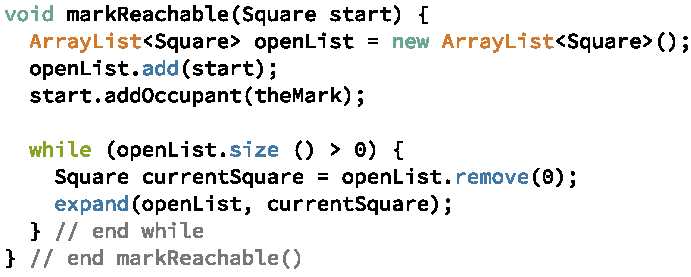
Let’s start by writing a markReachable method. This is a fairly straightforward conversion of the pseudocode to the Java code. We use a local variable openList to refer to an ArrayList of Squares. Initially, we put the starting Square on the open list and mark this Square as reachable. To mark a Square as reachable, we simply add a special object as an occupant of the Square. We will use this Mark object in a similar way to the way we used the Wall object: we will create one Mark object that will be placed in any Square that is to be marked. We can then check to see if the Mark object is contained in the Square to see if the Square has been marked. The code for markReachable is shown in Figure 5.1.1. The markReachable method uses the ArrayList’s remove method, passing a 0 in as the parameter. The call remove(0) removes and returns the first member of the list. The markReachable also calls the expand method, which we have yet to write, to expand each Square on the open list. Note that the expand method takes both openList and currentSquare as parameters. The expand method adds Squares to openList; however, because openList is a local variable in markReachable, expand would have no access to openList if it were not passed in as a parameter.
The parameters required by the algorithm are shown in parentheses as usual, so our expand method requires parameters openList, which is an ArrayList of Squares, and currentSquare, which is a Square. That is simple enough. Line 1 says to loop for each neighbor of currentSquare. What information do we need to determine which Squares are neighbors of the currentSquare. A Square object keeps track of its occupants, but not its neighbors. The Maze object keeps track of a list or rows, where each row is a list of Squares. If we knew where currentSquare appeared in these lists, we could compute the neighbors. For example, if currentSquare was the second Square in the third row, it would have four neighbors, the Squares in the first and third Squares of the second row, the second Square in the fourth row, and the second Square in the second row. Square objects, however, do not keep track of where they are in the grid. To find the exact position of currentSquare, we would have to search through the lists for the object referred to by currentSquare. It would make things simpler if the Square objects kept track of their positions. That way, we could simply ask currentSquare what its position is and then compute the neighbors based on that position. A more complicated approach would be to have the Squares keep track of their neighbors explicitly. We will return to that idea later. For now, having each Square keep track of its position will suffice.
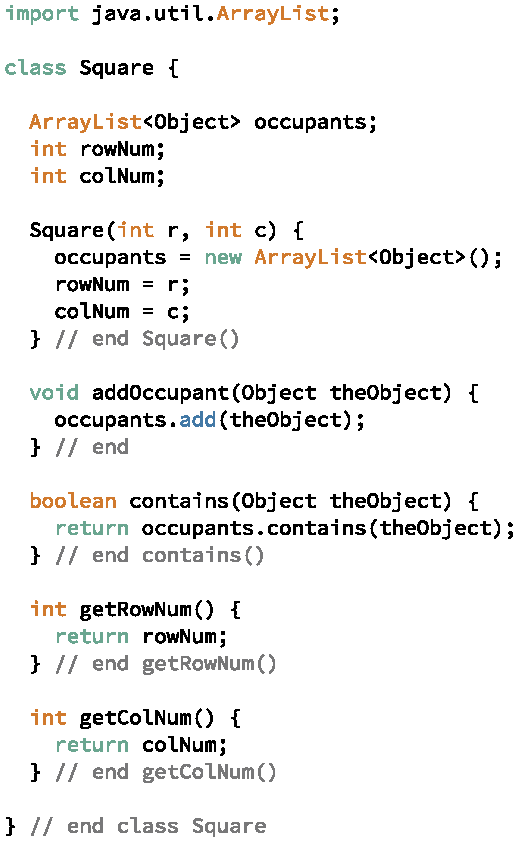
To have a Square object keep track of its row and column numbers, we will change the constructor to take the initial row and column numbers as parameters and record those values in the instance variables rowNum and colNum. We will also add getters that simply return the current values of the corresponding instance variables. Figure 5.1.2 shows the code for the modified Square class.
The Maze class creates an object to mark the Squares that we use in a similar way to the Wall object. A single object suffices; it will be added as an occupant of any Square to be marked. To determine whether a Square is marked, we simply check to see if the Square contains the Mark. The constructor for the Maze needs to tell each Square its row and column numbers at the time the Square is constructed. Figure 5.1.3 shows the code. Notice that the current size of grid is the number of the current row, but since we start counting at 0, the row number is one less than the size. The current size of the row, is the column number for the Square. We do not have to subtract one from the size to account for counts beginning at 0 because we have not yet added the Square to the row. After completely building the grid, the Maze constructor calls the yet to be written markReachable method with the top, left Square as a parameter to mark the Squares that are reachable from the top, left corner of the grid.
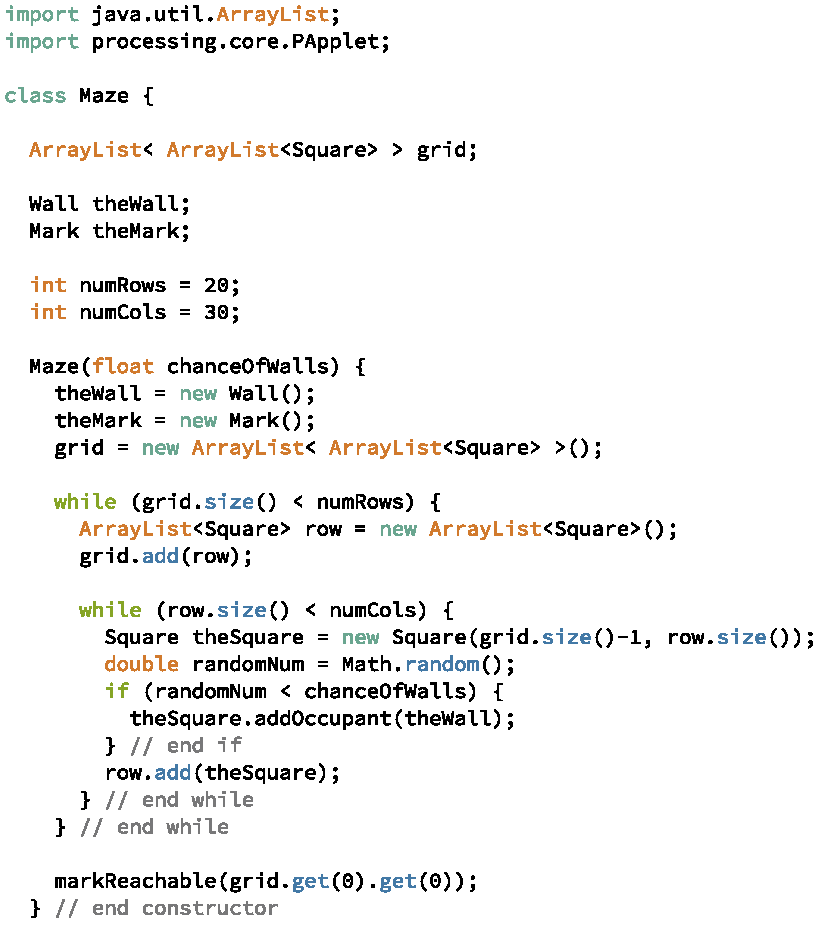
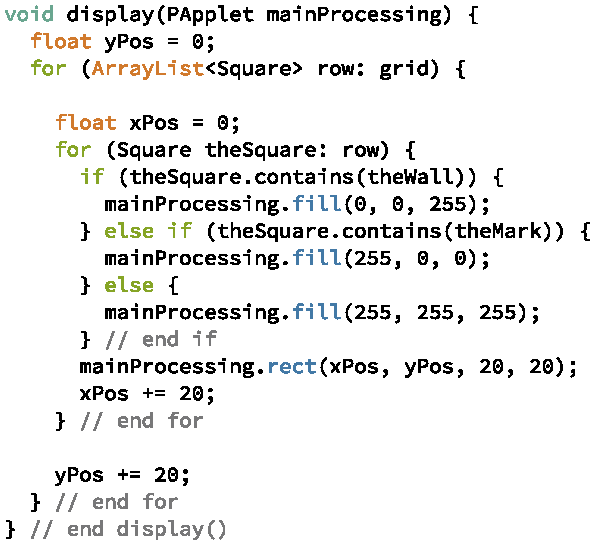
Figure 5.1.4 shows the changes to the display method to display the reachable Squares filled in with red. Notice that the display method need only check to see if a Square contains the Mark object in order to determine if the Square has been marked by markReachable.
Now that we have all of the supporting code in place, we can get back to writing the expand method. Here again is our algorithm for expand:
- expand(openList, currentSquare)
1 for each neighbor of currentSquare 2 if the neighbor is not marked and does not contain the Wall 3 then begin 4 mark the neighbor 5 add the neighbor to openList 6 end 7 end for
We can now implement Line 1 by retrieving the row and column numbers from currentSquare and checking the four neighboring Squares, that is, the Squares at positions (rowNum-1,colNum), (rowNum+1,colNum), (rowNum,colNum-1), (rowNum,colNum+1). We do have to be careful, however, that when checking the Squares along the edges, we do not try to access positions in the ArrayLists that do not exists. For example, we cannot check rowNum-1 when rowNum is 0
The code for the expand method is shown in Figure 5.1.5. It begins by calling the getters from the Square to get the row number and column number of currentSquare. It then checks the four boundaries to ensure that we only check legal positions in the grid. The expand method uses a helper method, checkAndAdd to check that the Square contains neither the Wall or the Mark, and if so, to mark the Square and add it to openList. Although this is a very short method whose code could easily be included directly in the expand method rather than in a separate method for expand to call, it is run four times in the expand method, making it a good candidate for a separate method. By making checkAndAdd a separate method, we have one place to make changes (and fix errors) rather than four.
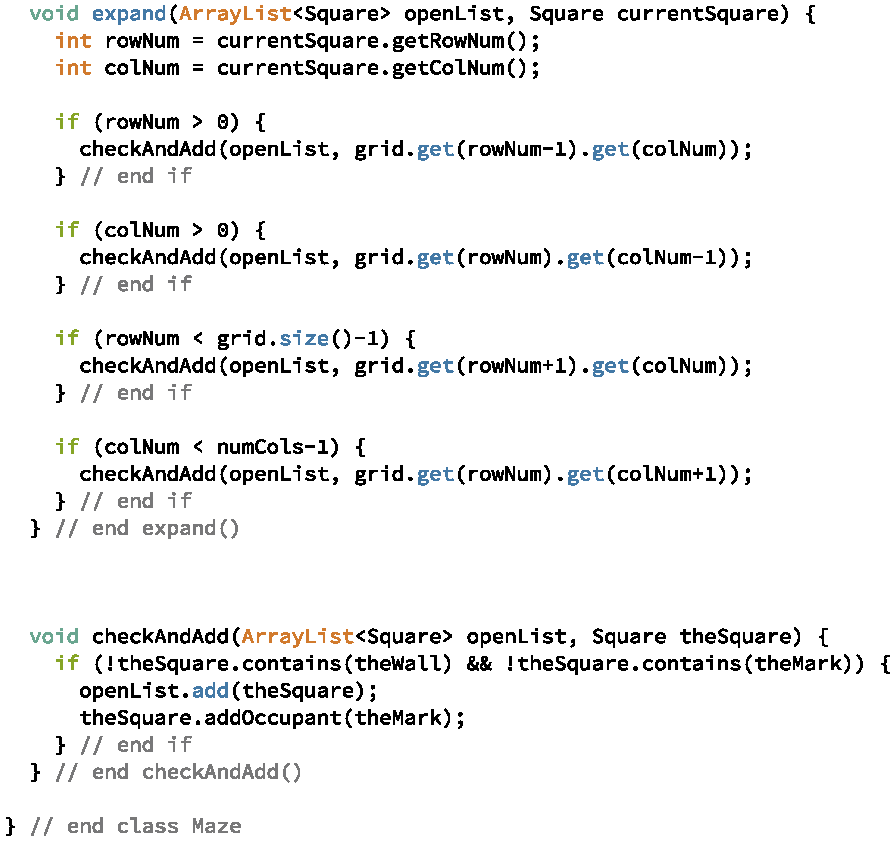
Figure 5.1.6 shows the Squares found in a Maze where most of the Squares are unreachable, while Figure 5.1.7 shows the Squares found in a Maze with no walls, where the distance from the starting Square is displayed. This illustrates the idea of breath-first search: the Squares one step away are expanded first, then the Squares two steps away, and so on until all reachable Squares have been found.
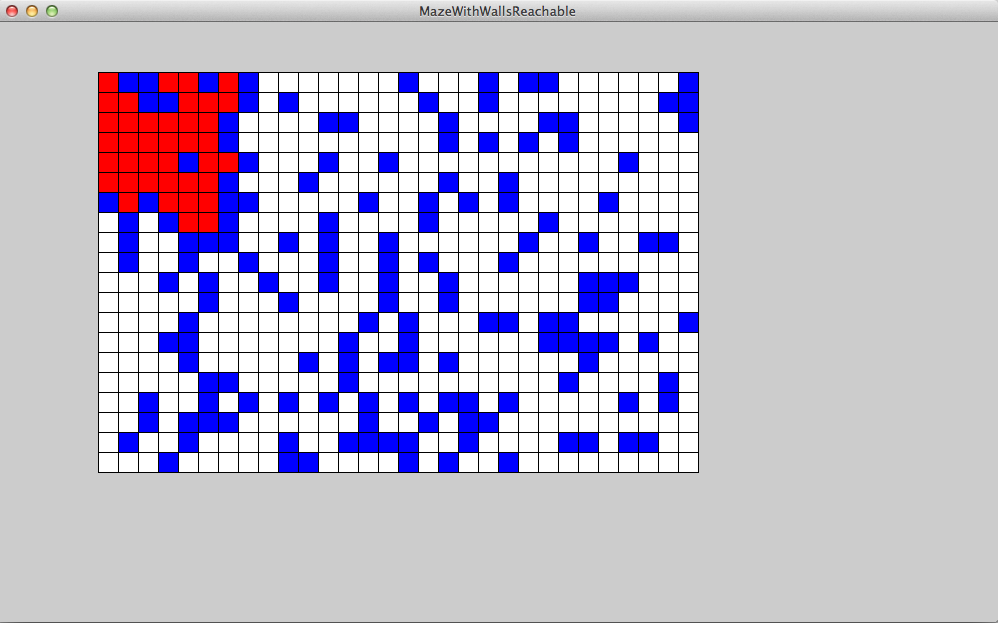
As an exercise, modify the Maze code to display the waves of Squares found with distances from the starting Square shown inside the Square and the colors of the Squares dependent on the distances from the starting Square. With walls, the output should appear something like that shown in Figure 5.1.8.